



 Creative system
August 18, 2026 · 8 min read
How to turn one Etsy listing into 12 useful Pinterest pins
A practical system for finding distinct search angles without cloning the same template twelve times.
Read articleA crew of AI agents designs fresh, on-brand pins for you every day.
They publish straight through Pinterest’s official API. No AI slop. You approve everything.
Free plan · 10 pins/month · No card required
Our own brand, Drape — first 90 days running on Canvasloop:
275
pins published
392k
impressions in 90 days
4.8k
saves in 90 days
1.22%
save rate
Daily impressions — last 90 days
peak 6.8k · Aug 8
Straight from Pinterest’s official analytics API for @drapecolors, our own brand. Don’t take our word for it — open the account and count.
Updated Sep 14, 2026. We don’t compare this to an “industry average” because Pinterest doesn’t publish one.
One click and ChatGPT, Perplexity or Grok digs in, finds the holes, and tells you if we fit. If we don’t, it’ll say so.
Ask your AI about usMost tools stop at scheduling. Canvasloop closes the loop: what your audience saves and clicks becomes the brief for the next batch.
The AI crew designs a batch of fresh pins from your brand brief — image, copy, board, keywords.
Approved pins go out on a steady, spaced-out cadence through Pinterest’s official API. You stay in control of what ships.
The Analyst scores each pin against your own account: what got saved, what got clicked, what flopped.
Winning formats and hooks feed straight into the next brief. Losers get retired, not repeated.
Design, copy, boards, scheduling, performance — five AI agents cover the full job, not just the image. It’s the same crew you’ll watch working in Mission Control.
Reads your brand and scouts the angle each pin should take
Writes the hook, title, and description in your brand voice for each pin concept
Designs the pin image itself — original, in your exact visual style
Picks the right board and tags so every pin lands where it performs
Scores every published pin 1–10 against your own account baseline
Your pins stop sounding like AI imagining Pinterest — and start speaking the language people actually search.
Pinterest’s spam filters target repetitive, templated content and inhuman cadence — regardless of which app publishes it. Canvasloop is built around that.
On Studio and Agency, approved pins publish themselves on schedule, straight through Pinterest’s own documented API (v5, OAuth) — the governed, official route.
Pinterest API v5 · Standard AccessThat’s an API access tier — not a Pinterest partnership or endorsement. No tool, ours included, can promise Pinterest won’t act on an account.
Not a stock template with the text swapped: the crew designs every pin from your brand’s brief, so nothing repeats the way spam filters flag.
Publishing by hand means re-typing the same four things into Pinterest’s composer, pin after pin. The Canvasloop Chrome extension pre-fills them for you — image, title, description, board — straight from your queue. You review and hit Publish.
Title
The Perfect Nude for Soft Summers▍
Description
Link
drapecolor.com/soft-summer
Board
Soft Summer Makeup
Drop your site and Canvasloop reads it — audience, visual style, goals. That brief is what every pin starts from, so nothing generic ever ships.
Director, Writer, Creator, and Tagger hand each pin down the line — image, copy, board, keywords. You approve the drafts you like; feedback re-runs the rest.
Director
Scouts trends & angles
Writer
Writes the hook & copy
Creator
Designs the visuals
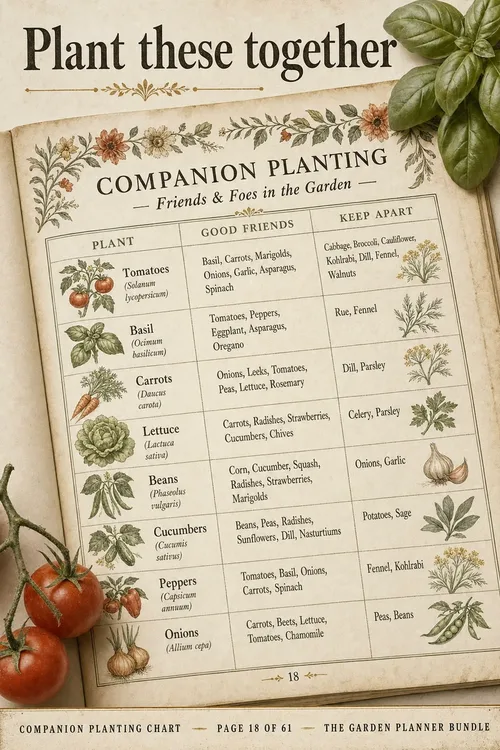
Writer Hook: “Plant these together” — keyword: companion planting chart…
1 draft to review
Image · title · description · board
Approved pins land on the schedule and publish on their own. Every one gets scored, and the next batch starts from what worked.
09:00 · Plant these together 13:00 · Grows with tomatoes
 17:00 · Raised bed layouts
 10:00 · Companion planting14:30 · Fall brassica planner08:30 · Container salad beds13:00 · Cottage garden plans09:00 · The July pivot
Practical systems for Etsy search, fresh creative, and consistent publishing. No passive-income promises or invented benchmarks.
Read the field guide →Creative systemAugust 18, 2026 · 8 min read
A practical system for finding distinct search angles without cloning the same template twelve times.
Read article Pinterest search
August 18, 2026 · 7 min read
A plain-language guide to turning product details into titles and descriptions people can actually find.
Read article Creative quality
August 18, 2026 · 6 min read
What should actually change from pin to pin—and what should stay recognizably yours.
Read articleHonestly: account standing depends on what you publish and how often, not on which vendor publishes it — no tool, Canvasloop included, can promise immunity from Pinterest enforcement, and we won't claim otherwise. What we do: design every pin fresh from your brand's brief instead of reusing a template, ramp new accounts up gradually — a few pins a day in your first month — and put a human approval on every pin before it goes out.
The whole pin, not a template fill-in: the Creator designs an original image in your visual style, the Writer writes the title and description in your brand voice, and the Tagger picks the board. You describe your brand once; every batch starts from that brief.
No. You approve what goes live — from the calendar or in one tap from the assistant. On Studio and Agency, approved pins then publish themselves on schedule; on Free and Starter you click Publish on each one. If a batch isn't right, send feedback and the crew re-runs with your notes.
Every published pin gets scored 1–10 by the Analyst against your own account baseline — save rate, outbound clicks, format. Those verdicts become a performance brief that the Director and Writer read before creating the next batch. That loop is the product: your tenth batch is measurably smarter than your first.
Yes — $0 forever, 10 pins per month, no card required. Every plan publishes through Pinterest's official API. On Free and Starter ($19.99/month) you click Publish on each approved pin; automatic scheduled publishing — the hands-off autopilot — starts on Studio.
Tailwind arranges your own photos into templates and schedules them; Canvasloop designs original pins from your brand brief instead of a template. Pin Generator turns product feeds into pins in bulk; Canvasloop directs each pin creatively and learns from its performance — quality over volume. Full head-to-heads: Canvasloop vs Tailwind and vs Pin Generator.
That’s the point — every batch after learns from what worked. Start free, no card required.